
Try this keyboard: Sanskrit Keyboard
Prepare a separate practice line
Open the Sanskrit keyboard. If a browser draft is already present, save it before using the trash button to start this exercise. Put the caret in the main editor and make sure Shift, Caps and Alt Gr are off. This gives the sample a predictable starting point.
Inspect equals, slash and period on the displayed keyboard. The exercise uses shifted equals for ऋ, base slash for ॐ and shifted period for ।. It is a character inventory test, not a phrase or a model for arranging these items in meaningful text.
Enter the three-character exercise
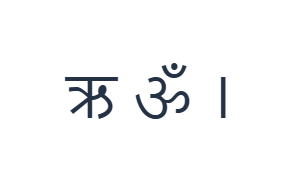
Use these positions in order: Shift + = for ऋ; then / for ॐ; then Shift + . for ।. Add one Space between each output. When using on-screen modifiers, switch them off before moving to a different layer. The resulting editor text is ऋ ॐ ।. It is a character exercise, not a word or a translation.
Turn Shift off before the slash output, then turn it on for the final period output. The base equals character is ृ, which differs from the independent vowel ऋ. Reading the active label prevents a sign from being substituted for the intended letter.
Check the result before reusing it
Check the three separated outputs against their key labels. For real text, decide whether an independent vowel or a dependent sign is required before typing. The engine inserts what you choose; it does not infer a syllable or repair character order afterward.
Check coverage before preparing specialist material. The retained base D and F positions both insert ॑, and required signs may be missing. Use another suitable input source for those characters or the complete passage, then review the stored text before applying its visual style.
Save the exercise as a PNG image
Open Text style from the font icon. Use Arial at 28 px, Automatic color, and Left to right direction. Turn bold, italic, underline and strikethrough off. These settings apply to the whole editor. A font changes appearance, not the stored characters; your device may use a fallback font for unsupported shapes. Choose Done to close the style dialog.
Choose Save image to save the complete exercise as a PNG, with centered lines and dark text on a white background. Open the file and compare it with the sample. For an editable alternative, choose Save Word (.docx) to create a real .docx, or use Copy text for plain text. These actions use all the editor text even when only part is selected.
i2type-sanskrit.pngi2type-sanskrit.docx
Tips for this layout
Separate text from its presentation
A different font can alter the appearance of a sign without changing its identity. Verify the entered characters before adjusting typography.
Use a reviewed source
For study or scholarly material, compare the complete sequence with a trusted text. Availability on the keyboard is not proof that a form is correct in context.
Common questions
What is the difference between the two equals layers?
Base equals supplies ृ, while Shift with equals supplies ऋ. They are different mapped characters, not case variants.
Can this convert Roman Sanskrit spelling?
No. The visible keys insert Devanagari characters directly, with no Roman-spelling conversion step.
Does this provide every specialist mark?
No. It is a limited retained mapping. Paste required missing characters from another suitable source and inspect the result before export.
Try the Sanskrit exercise
Use the small inventory test first, then choose an input source that covers every character required by the complete Sanskrit text.