
Try this keyboard: Punjabi Keyboard
Prepare a separate practice line
Open the Punjabi keyboard. If a browser draft is already present, save it before using the trash button to start this exercise. Put the caret in the main editor and make sure Shift, Caps and Alt Gr are off. This gives the sample a predictable starting point.
Begin at K, which supplies ਕ on the base layer. The test then uses two Alt Gr outputs: a digit and another letter. Spaces keep them separate; the result is a mapping exercise rather than a Punjabi word or a numeric expression.
Enter the three-character exercise
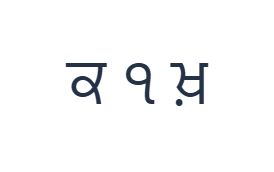
Use these positions in order: K for ਕ; then Alt Gr + 1 for ੧; then Alt Gr + K for ਖ਼. Add one Space between each output. When using on-screen modifiers, switch them off before moving to a different layer. The resulting editor text is ਕ ੧ ਖ਼. It is a character exercise, not a word or a translation.
Alt Gr with 1 supplies ੧ and Alt Gr with K supplies ਖ਼. Keep Alt Gr active for those two items, then turn it off. Shift with K would instead produce ਖ, so inspect the chosen layer rather than assuming the modifiers are interchangeable.
Check the result before reusing it
Read the middle item as the Gurmukhi digit supplied by the visible key. If nothing entered when you tried the base number row, that is not a reason to keep pressing it: the base positions are empty. Select the layer that actually shows the desired digit.
For real text, distinguish a consonant, a dependent sign and an independent vowel. This page inserts them directly, leaving the browser to render their sequence. It does not convert Roman spelling or proofread the order, so review a completed passage before saving.
Save the exercise as a PNG image
Open Text style from the font icon. Use Arial at 28 px, Automatic color, and Left to right direction. Turn bold, italic, underline and strikethrough off. These settings apply to the whole editor. A font changes appearance, not the stored characters; your device may use a fallback font for unsupported shapes. Choose Done to close the style dialog.
Choose Save image to save the complete exercise as a PNG, with centered lines and dark text on a white background. Open the file and compare it with the sample. For an editable alternative, choose Save Word (.docx) to create a real .docx, or use Copy text for plain text. These actions use all the editor text even when only part is selected.
i2type-punjabi.pngi2type-punjabi.docx
Tips for this layout
Compare the two K alternatives
Shift gives ਖ while Alt Gr gives ਖ਼. They are explicit mapped outputs; choose the one required by your reviewed text.
Check numeral style early
Before preparing a numbered list or a date, decide which digit forms the destination requires and verify that you can enter them.
Common questions
Why are the number keys empty at first?
The retained base row has no outputs at those positions. Alt Gr reveals the Gurmukhi digits, including ੧ at 1.
Does typing Roman letters produce Punjabi words?
No. This is direct Gurmukhi entry. The large symbols show the characters inserted at the caret.
Can I paste text made with another Punjabi keyboard?
Yes. Paste reviewed text into the editor, then use the same whole-editor styling, copying and download controls.
Try the Punjabi exercise
Use the letter-and-digit test to learn Alt Gr, then review the complete Gurmukhi sequence for your own document.