
Try this keyboard: Romanian Keyboard
Prepare a separate practice line
Open the Romanian keyboard. If a browser draft is already present, save it before using the trash button to start this exercise. Put the caret in the main editor and make sure Shift, Caps and Alt Gr are off. This gives the sample a predictable starting point.
Locate backquote and the two bracket positions. They provide the three sample letters without a separate accent sequence. The final item uses Shift at right bracket to check uppercase Î while the first two remain lowercase.
Enter the three-character exercise
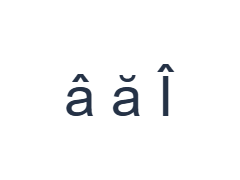
Use these positions in order: ` for â; then [ for ă; then Shift + ] for Î. Add one Space between each output. When using on-screen modifiers, switch them off before moving to a different layer. The resulting editor text is â ă Î. It is a character exercise, not a word or a translation.
Turn Shift off after Î. The circumflex and breve in these outputs are part of the mapped letters; adding a separate mark is unnecessary. Keep the spaces so the three characters can be compared individually in the editor and saved file.
Check the result before reusing it
Check each sample letter, then inspect any ş or ţ in your real text. The retained keys produce those cedilla forms, not ș and ț. A font can make the distinction subtle, but Copy preserves the entered character; it does not replace one form with another.
When comma-below forms are required, paste the exact letters or use another input method that supplies them. Review the entire passage before formatting. Changing the font or downloading Word cannot correct a wrong stored character, even when its display happens to look similar.
Save the exercise as a PNG image
Open Text style from the font icon. Use Arial at 28 px, Automatic color, and Left to right direction. Turn bold, italic, underline and strikethrough off. These settings apply to the whole editor. A font changes appearance, not the stored characters; your device may use a fallback font for unsupported shapes. Choose Done to close the style dialog.
Choose Save image to save the complete exercise as a PNG, with centered lines and dark text on a white background. Open the file and compare it with the sample. For an editable alternative, choose Save Word (.docx) to create a real .docx, or use Copy text for plain text. These actions use all the editor text even when only part is selected.
i2type-romanian.pngi2type-romanian.docx
Tips for this layout
Keep the target letters available
Use a reviewed source for the intended ș and ț forms when pasting them. Avoid judging solely by a tiny on-screen mark.
Check punctuation layers
Alt Gr provides extra punctuation and literal accent marks. These marks do not start an automatic accent-composition sequence.
Common questions
Where is uppercase Î?
Use Shift with right bracket. The base output at that position is î.
Does this map insert ș and ț?
Its semicolon and quote mappings insert cedilla forms ş and ţ. Paste the comma-below forms when those are required.
Will a Word file normalize those letters?
The download preserves the entered text rather than correcting character choices. Check the passage before saving and again in the receiving application.
Try the Romanian exercise
Practice the direct letters, then review the comma-below distinction before making your final Romanian file.